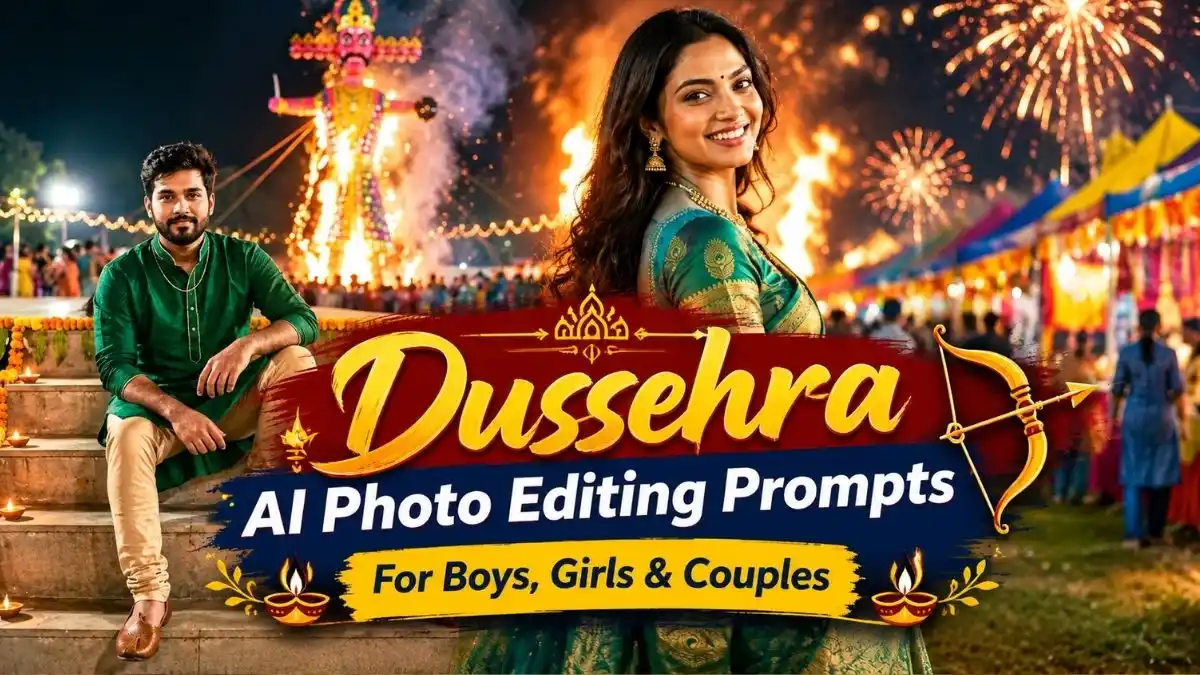
Dussehra is a festival filled with colorful fairs, traditional outfits, festive lights, and the excitement of Ravan Dahan. These moments can become beautiful photo ideas when you use the right AI prompt with your own reference photo.
With these Dussehra AI Photo Editing Prompts, you can create realistic festive portraits, traditional looks, and candid couple photographs using Gemini or other compatible AI image tools. Choose a style that matches your personality, upload a clear reference photo, and customize the prompt to create a result that feels natural and personal.
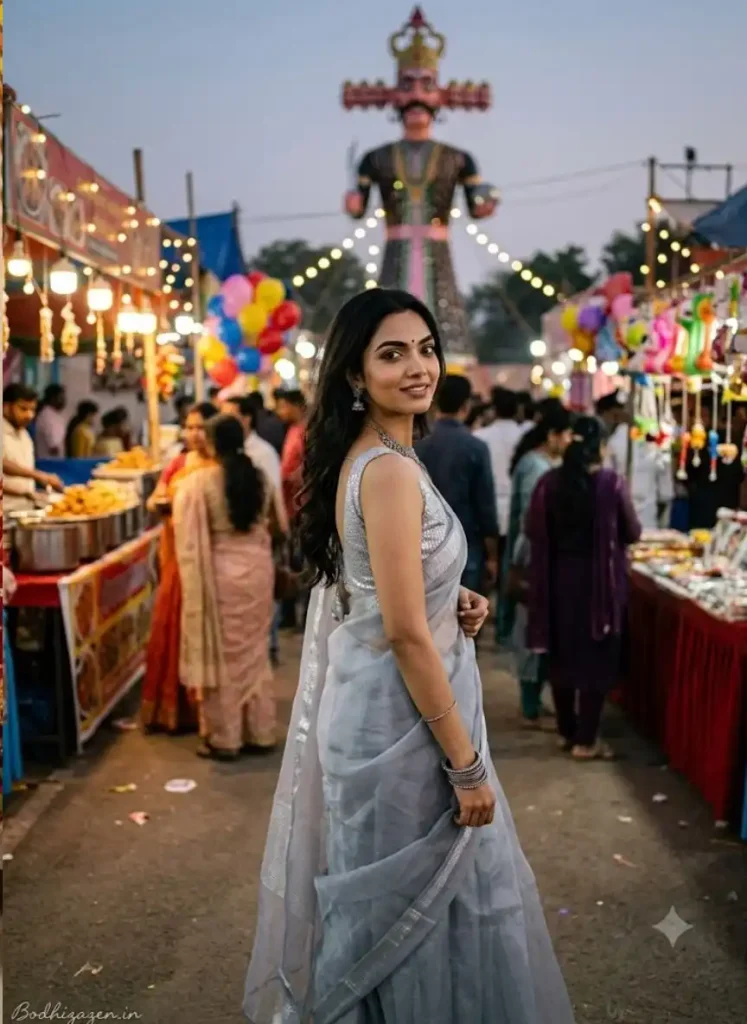
1. Dussehra AI Photo Editing Prompt for Girls in a Silver Saree
Use the attached reference photo of the girl. Keep her face 100% identical to the reference image with no face change. Do not reshape, morph, beautify, or stylize any facial features. Maintain the exact original facial proportions, contours, natural skin details, and overall likeness.
Output Settings
Aspect ratio: 3:4
Orientation: Portrait
Resolution: 2304 × 3072 pixels
Realism and Camera Settings
Create an authentic candid street photograph captured with a real camera. The image must look natural and realistic, not AI-generated.
Camera: Sony A7 III
Lens: 35mm f/1.8
ISO: 400
Shutter speed: 1/320s
Use natural street photography aesthetics with true skin texture, mild film grain, realistic depth of field, natural colors, and no HDR or plastic-looking skin.
Subject
A girl with a relaxed and curious expression and a soft natural smile.
Outfit and Accessories
She is wearing a beautiful soft grey organza saree with an elegant silver thread border and a matching silver sequin blouse. Complete the look with an oxidized silver necklace, traditional silver jhumka earrings, and stacked silver bangles. The saree fabric should look lightweight and realistic with natural folds and movement.
Pose and Movement
The girl is walking through a busy Dussehra mela and glancing back over her shoulder toward the camera. One hand is lightly holding the saree pleats while she walks. Capture a natural candid stride with realistic body movement and an effortless expression.
Background
A lively Dussehra fairground during the evening with colorful stalls, balloons, decorative hanging lights, and a giant Ravan effigy visible in the distant background. Include a festive crowd with people softly blurred to create authentic depth and atmosphere.
Lighting
A dusky evening sky with warm light coming from the fairground stalls. Use soft ambient fill, natural contrast, realistic shadows, and balanced exposure. Preserve the authentic atmosphere of an Indian Dussehra festival.
Negative Prompt
Different face, face change, altered facial features, face morphing, beautification, reshaped face, airbrushed skin, plastic skin, artificial skin texture, cartoon, 3D render, painting, distorted hands, extra fingers, blurry image, text errors, HDR effect, unnatural colors, artificial lighting, unrealistic saree folds, overprocessed image.
ASPECT RATIO: 3:4 vertical TEXT / SIGNATURE: Add “Bodhizazen .in” bottom-left, handwritten signature-style, thin cursive strokes, small size, subtle premium elegance, white / soft off-white.
Create a graceful festive portrait with a soft grey organza saree, silver jewellery, and the lively atmosphere of a Dussehra mela. This look is ideal for anyone who prefers candid street photography over heavily edited festive portraits.
2. Dussehra Festival Photo Editing Prompt
Use the attached reference photo of the girl as the identity reference. Preserve her original face and likeness as closely as possible. Do not reshape, morph, beautify, or stylize facial features. Maintain the original facial proportions, contours, natural skin details, and overall appearance.
Output Settings
Aspect Ratio: 3:4
Orientation: Portrait
Resolution: 2304 × 3072
Realism and Camera Style
Create an authentic candid festival-night photograph captured with a real camera. The image must look natural and photorealistic, not AI-generated.
Camera: Nikon Z7 II
Lens: 50mm f/1.4
ISO: 1000
Shutter Speed: 1/250s
Maintain true skin texture, subtle natural grain, realistic bokeh from festival lights, and natural photographic details. Avoid HDR effects and plastic-looking skin.
Subject
A girl with a radiant, happy, and celebratory smile.
Outfit and Styling
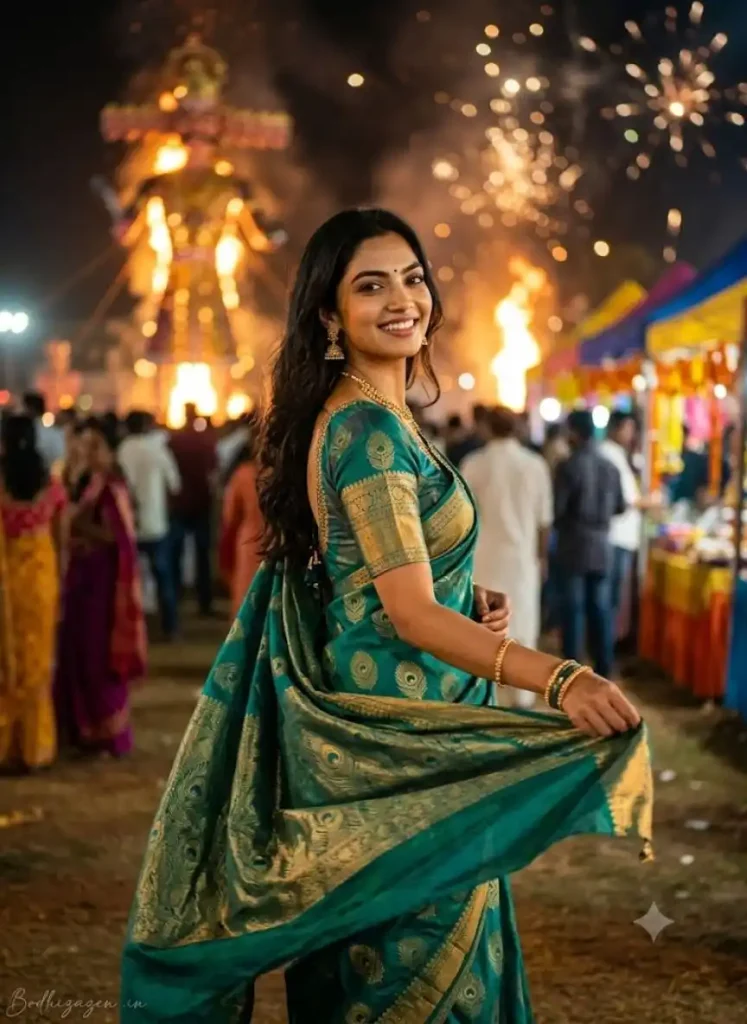
She is wearing a beautiful peacock green Kanjivaram silk saree featuring intricate peacock-feather zari motifs and an elegant gold border. Pair it with a teal and gold blouse, traditional gold jhumkas, a layered gold necklace, and matching bangles.
The silk fabric should have realistic texture, natural folds, and authentic gold-thread detailing.
Pose and Movement
Capture her turning mid-step with the saree pallu flowing gracefully behind her. She is looking back at the camera over her shoulder with a joyful smile while lifting the pallu with one hand. The photograph should capture a natural mid-movement moment with realistic fabric motion and an elegant festive appearance.
Background and Environment
A vibrant Dussehra evening celebration at a Ravan Dahan ground. A burning Ravan effigy is visible far in the background, with soft fireworks bokeh illuminating the night sky. A festive crowd appears naturally blurred in the distance, surrounded by warm glowing lights.
Keep the background realistic and atmospheric while ensuring the girl remains the main subject.
Lighting
Use warm firelight and fireworks glow illuminating one side of her face and outfit. Balance this with cool nighttime ambience on the opposite side. Add a subtle natural rim light around her hair. Maintain realistic shadows, natural skin tones, and authentic low-light photography.
Negative Prompt
Different face
Face change
Facial reshaping
Beautification
Airbrushed skin
Plastic skin
Cartoon
3D render
Painting
Distorted hands
Extra fingers
Blurry image
Text errors
HDR effects
Unnatural skin tones
Artificial lighting
Unrealistic fabric movement
Overprocessed details
Final Instruction
Create a highly realistic, candid Dussehra festival photograph with authentic Indian festive styling, natural movement, lifelike skin texture, realistic nighttime lighting, and professional camera quality. Preserve the identity of the girl from the reference image as closely as possible without intentionally altering her facial features.
ASPECT RATIO: 3:4 vertical TEXT / SIGNATURE: Add “Bodhizazen .in” bottom-left, handwritten signature-style, thin cursive strokes, small size, subtle premium elegance, white / soft off-white.
A peacock-green silk saree paired with gold jewellery creates a rich traditional appearance for festive photography. This concept focuses on a joyful mid-movement pose, glowing fairground lights, and the atmosphere of Ravan Dahan.
3. Realistic Dussehra AI Photo Prompt for Boys
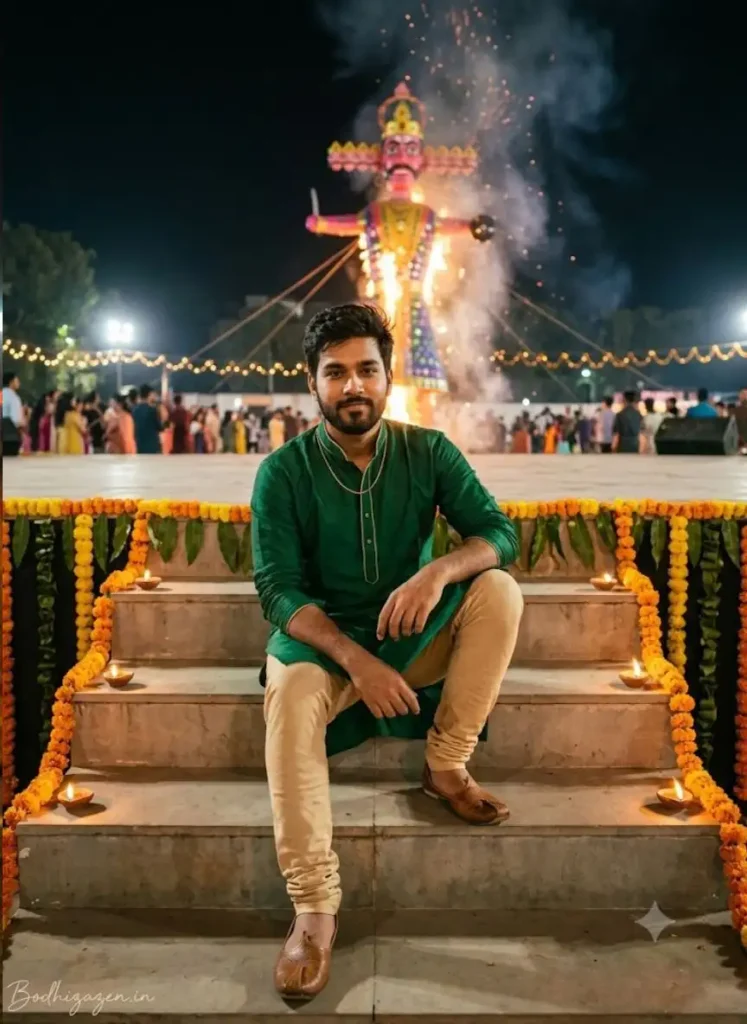
Pose: Sitting casually on decorated stage steps, one arm resting on the knee, with a confident and relaxed expression
Wardrobe
Primary outfit: Emerald green kurta with gold piping
Lower garment: Beige churidar
Overall style: Festive relaxed elegance
Environment
Setting: Decorated Dussehra stage steps with marigold and flower decorations
Background
Ravana effigy: A tall Ravana effigy standing and burning behind the stage
Flower decor: Marigold garlands framing the edges of the stage
Camera
Angle: Eye-level shot, medium-close to full body
Note: Keep all remaining fields the same as Variant
ASPECT RATIO: 3:4 vertical TEXT / SIGNATURE: Add “Bodhizazen.in” bottom-left, handwritten signature-style, thin cursive strokes, small size, subtle premium elegance, white / soft off-white.
Not every festive portrait needs a dramatic pose or a crowded background. A relaxed photograph on decorated stage steps can give boys a confident, understated traditional look while keeping the focus on the outfit and natural expression.
4. Dussehra Photo Editing Prompt for Boys with a Happy Dussehra Greeting
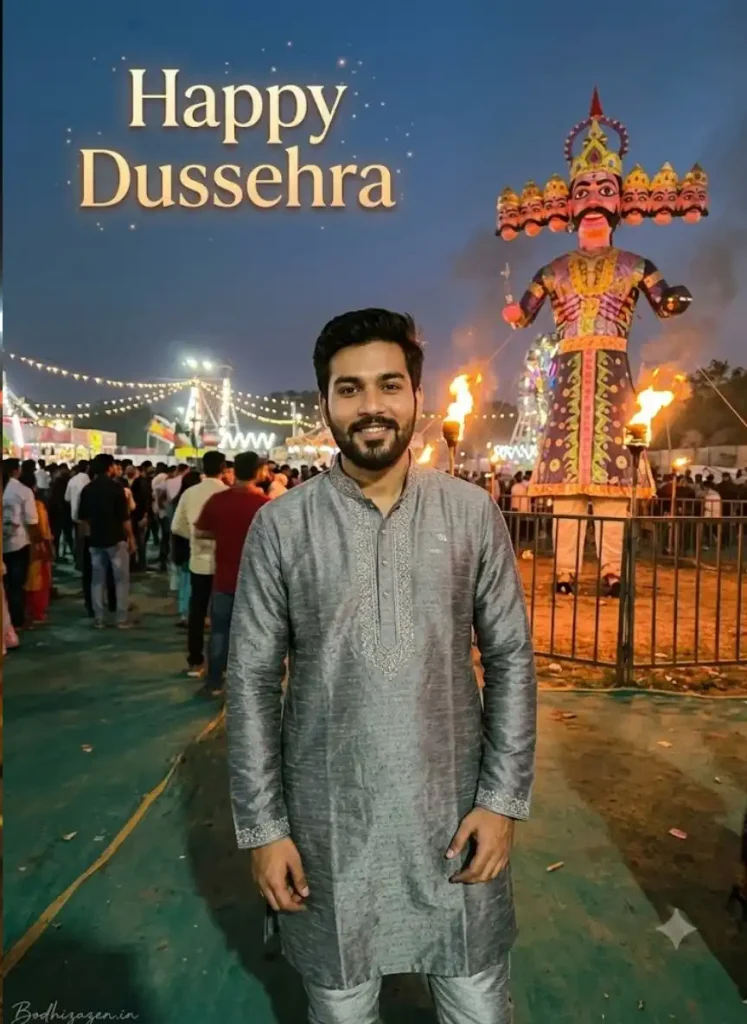
Calm standing portrait with hands resting near the waist and a natural relaxed smile. Keep slight headroom above the subject for text. The photo should look like a candid festival photograph taken by a friend.
Wardrobe
Grey kurta with silver embroidery and matching silver-grey pyjama. Elegant understated festive styling with a natural everyday-wear feel.
Environment
A quiet corner of the fairground just before Ravan Dahan begins. A tall Ravana effigy should be clearly visible in the background with torches around its base. The effigy should not be fully lit yet. Include festive lights throughout the background.
Lighting
Soft golden hour lighting blended naturally with festive torchlight. Maintain a realistic unposed atmosphere.
Greeting Text Overlay
Add the text Happy Dussehra in the upper-left area of the frame above the subject and away from the face. Use an elegant festive display font with a gold gradient and soft warm glow. Add subtle sparkles that blend naturally with the golden-hour lighting. The greeting should look like a genuine festive photo caption rather than a pasted sticker.
Authenticity
Maintain the same realism as Variant 11. The image should look like a real camera or phone photograph with natural imperfections and realistic skin texture. Avoid an AI-generated appearance a plastic or waxy look and unnatural symmetry.
Additional Settings
Copy and merge all remaining fields from Variant 11 including identity preservation watermark aspect ratio negative prompt visual quality and cultural styling.
ASPECT RATIO: 3:4 vertical TEXT / SIGNATURE: Add “Bodhizazen.in” bottom-left, handwritten signature-style, thin cursive strokes, small size, subtle premium elegance, white / soft off-white.
A grey traditional outfit and a golden festive background create a simple yet polished Dussehra portrait. The greeting text adds a celebratory touch without making the photograph look like an ordinary festival poster.
5. Dussehra Couple AI Photo Prompt for a Traditional Mela Walk
Create an ultra photorealistic vertical 3:4 Dussehra festival photograph using @Image2 as the strict identity reference for both people. The image must look like a genuine candid DSLR photograph captured by a professional festival photographer and not like AI generated artwork.
IDENTITY PRESERVATION
Preserve the exact identity of both the man and woman from @Image2. Maintain their original facial features, face shape, facial proportions, natural skin texture, original skin tone, hairstyle, age and body proportions. Do not alter their faces. No face swapping, artificial beautification, facial stylization or age modification.
COUPLE AND POSE
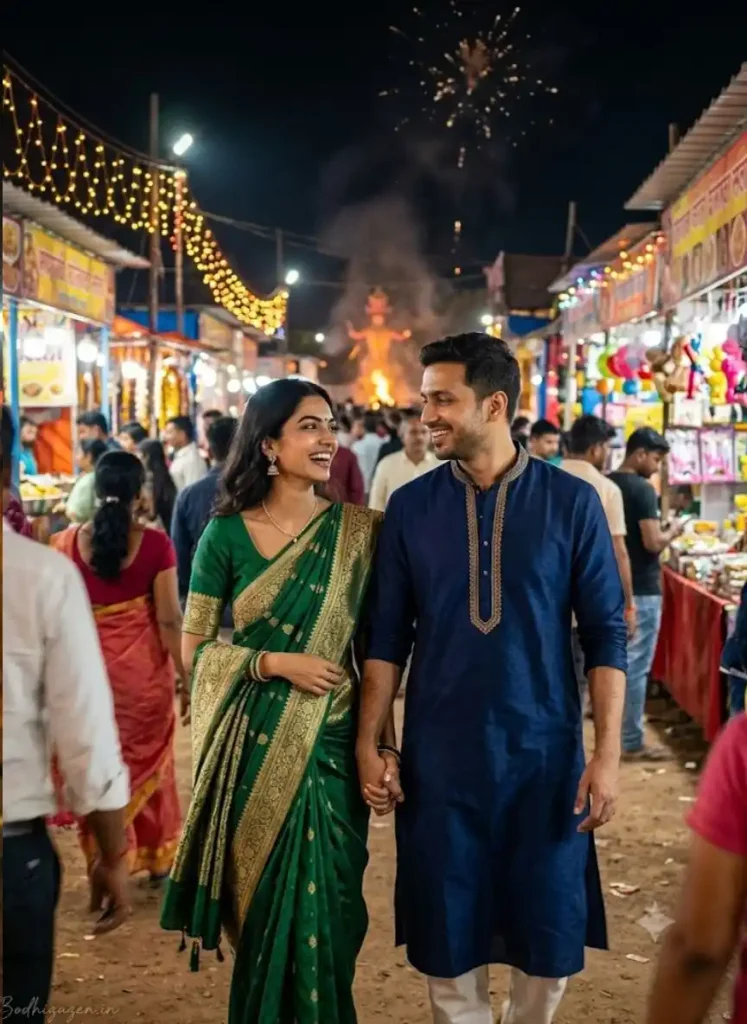
Show the same couple walking hand in hand through a crowded Dussehra mela lane. Capture them naturally mid stride while laughing candidly and looking at each other. Their expressions and body language should feel spontaneous, joyful and authentic. Keep both people clearly visible and sharply focused while the moving crowd and background stalls have subtle natural motion blur.
MALE SUBJECT
The man wears a deep navy blue traditional kurta made from premium cotton silk fabric with elegant gold thread embroidery. The outfit should look luxurious and festive while maintaining realistic fabric folds and natural movement. Preserve his exact facial identity and natural appearance from @Image2.
FEMALE SUBJECT
The woman wears an elegant emerald green and gold Banarasi style traditional saree with intricate festive detailing and a beautifully draped pallu. Add traditional jhumka earrings and a simple elegant necklace. The saree fabric should have realistic silk texture and natural folds. Preserve her exact facial identity, original skin tone and natural appearance from @Image2.
DUSSEHRA FESTIVAL ENVIRONMENT
Set the scene in a lively and crowded Dussehra mela lane at night with colorful food stalls on both sides. Include warm decorative string lights, traditional festive decorations and naturally blurred people walking around the couple.
In the far distant background show a small Ravana effigy during Ravana Dahan with a faint orange fire glow visible above the rooftops. Add a few realistic fireworks in the upper night sky. Keep the Ravana effigy and fireworks subtle and distant so the couple remains the primary focus.
CAMERA AND PHOTOGRAPHY STYLE
Simulate a genuine handheld DSLR photograph captured with a 50mm prime lens at f/1.8. Use realistic depth of field, natural perspective, authentic skin pores, fine natural film grain and imperfect ambient lighting. Include subtle lens flare from decorative string lights and naturally uneven directional shadows from the surrounding stalls.
Use warm 3200K festival lighting with a realistic mixture of decorative string lights and diya glow. Maintain balanced exposure, natural skin colors and realistic nighttime contrast. The image should resemble an authentic candid photograph rather than a studio portrait or a digitally rendered scene.
IMAGE QUALITY AND REALISM
Ultra photorealistic photography with natural human anatomy, realistic hands and fingers, detailed embroidery, authentic silk texture, believable facial expressions, natural body proportions and realistic background perspective. Maintain the natural imperfections of real photography without excessive retouching or artificial smoothness.
NEGATIVE PROMPT
AI generated appearance, CGI, 3D render, digital painting, cartoon, anime, plastic skin, overly smooth skin, airbrushed faces, artificial facial features, altered identity, face swap, changed hairstyle, changed age, distorted hands, extra fingers, missing fingers, deformed anatomy, duplicate people, unnatural body proportions, stiff poses, fake smiles, excessive sharpening, studio perfect symmetry, unrealistic lighting, overexposed highlights, oversaturated colors, blurry faces, random text, extra logos and unwanted watermarks.
WATERMARK AND SIGNATURE
Add only the text Bodhizazen.in in the bottom left corner of the image. Render it as a handwritten signature with thin cursive strokes, a small size and subtle premium elegance. Use white or soft off-white lettering with slightly understated visibility. Blend the signature naturally into the image without distracting from the subjects. Do not add any other text, logo or watermark.
FINAL GENERATION INSTRUCTION
Generate an ultra photorealistic vertical 3:4 Dussehra mela photograph featuring the exact same man and woman from @Image2. The man must wear a deep navy blue and gold embroidered kurta and the woman must wear an emerald green and gold Banarasi style saree. Show them laughing naturally while walking hand in hand through a crowded festive mela lane. Include colorful food stalls, warm decorative lights, a faint Ravana Dahan glow in the far distant background and a few fireworks in the night sky. Preserve both identities faithfully and maintain realistic skin texture, natural expressions, authentic clothing details and candid photographic imperfections. The final result must look like a genuine photograph taken with a professional DSLR camera. Add only the Bodhizazen.in handwritten signature at the bottom left.
ASPECT RATIO: 3:4 vertical
Couple photographs often look more natural when both people are captured in motion rather than standing in a formal pose. This prompt combines traditional Indian clothing, warm market lights, and a candid moment during a Dussehra fair.
How to Create Dussehra Photos Using Gemini
You can use these prompts with Gemini or another AI image tool that supports reference-photo editing. Follow these steps for a more controlled result:
Choose a clear photo: Select a reference image in which the face is visible and well lit.
Upload the image: Add your photo to the AI tool.
Copy a prompt: Choose the Dussehra look you want and paste the complete prompt.
Check the result: Review facial resemblance, hands, jewellery, clothing details, and the background.
Refine specific details: If something looks incorrect, ask the tool to fix that detail while keeping the rest of the image unchanged.
Save the final image: Review the image and download it in the best available quality.
Available features and results can vary by tool, account, and region. AI tools may not preserve every facial detail perfectly, so always review the generated result.
Tips for More Realistic Dussehra AI Photos
Use a clear reference image with minimal obstruction of the face.
Describe the outfit, pose, lighting, and background separately for clearer instructions.
Use specific details such as natural skin texture, realistic silk folds, and candid festival photography rather than relying only on words like “8K” or “ultra-realistic.”
Keep Ravan Dahan and fireworks in the background when the person or couple should remain the main subject.
Check greeting text and signature spelling before sharing the image.
Use only photos you have permission to upload and edit.
Frequently Asked Questions
1. Which Dussehra AI Photo Editing Prompts are best for girls?
Prompts featuring a silver organza saree or a peacock-green Kanjivaram saree are good options for traditional festive portraits. Choose the one that best matches your preferred clothing and photography style.
2. Can I create a Dussehra Couple AI Photo using Gemini?
Yes. If your version of Gemini supports image uploads and editing, you can upload a couple’s reference photo and provide a detailed prompt describing the outfits, pose, and Dussehra setting. Review the result to check whether both people remain recognizable.
3. How can I make a Dussehra photo look realistic?
Use a clear reference image and describe natural lighting, authentic skin texture, realistic fabric folds, and believable background details. Avoid overly smooth skin, exaggerated effects, and excessive sharpening.
4. Can I add a Happy Dussehra greeting to an AI photo?
Yes. Include the exact greeting, its position, font style, and color in the prompt. Since image tools can sometimes produce incorrect lettering, check the final text and correct it if needed.
Final Thoughts
The right Dussehra AI Photo Editing Prompts can help you explore different festive styles, from traditional saree portraits and relaxed kurta looks to candid couple photographs at a Dussehra mela. Choose a concept that suits your style, use a suitable reference photo, and refine the details until the result feels natural.
Whether you are creating a Dussehra Festival Photo Editing Prompt for yourself or a Dussehra Couple AI Photo Prompt for a shared memory, focus on realistic expressions, authentic Indian festive styling, and a background that complements the subject.
Hello, I am Lavita, an AI content writer at Bodhi Zazen. I am passionate about exploring and understanding the latest developments and advancements in generative AI. I write about AI image and video prompts, ChatGPT prompts, Gemini AI, AI tools, and step-by-step AI guides, helping readers create better content and stay ahead in the rapidly evolving AI landscape. My focus is on publishing articles that are well-researched, practical, and easy to understand and implement. My goal is to make AI accessible to a wider audience while providing accurate, reliable, and useful information that you can use with confidence.